One Line, Thousands of Secrets: The Codecov Bash Uploader Breach
One Line, Thousands of Secrets: The Codecov Bash Uploader Breach
The breach did not begin with malware in a binary or a zero-day in a firewall.
It began with a script line.
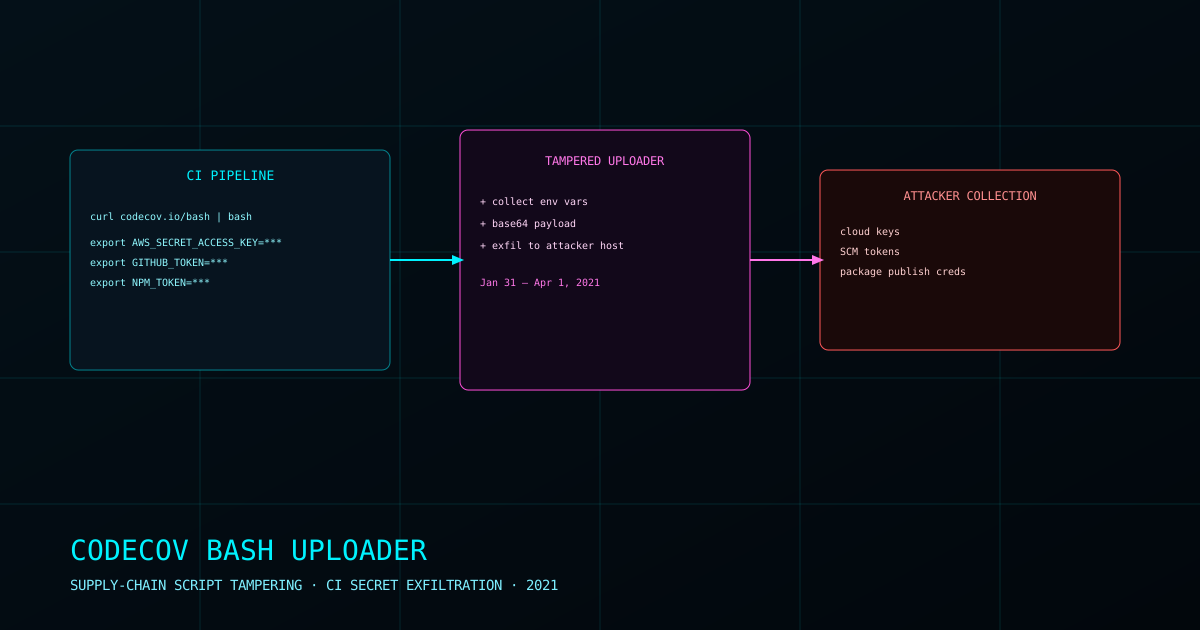
In early 2021, attackers compromised Codecov’s infrastructure and altered the company’s widely used Bash Uploader — the helper script many engineering teams ran automatically in CI pipelines to upload test coverage results.
The modified script still did its normal job. Coverage data still uploaded. Builds still passed.
But the script also exfiltrated environment variables from customer CI jobs to attacker-controlled infrastructure.
For modern software companies, environment variables are where high-value secrets live: cloud credentials, API keys, signing tokens, artifact registry passwords, and deployment keys. One trusted script in one trusted place became a tap into thousands of build systems.
Why This Attack Worked
The Bash Uploader was often fetched and executed dynamically during CI runs using a one-liner pattern. Teams trusted the Codecov domain and assumed the script content was safe.
That trust model created a single point of systemic risk:
- If the host serving the script is compromised
- Every downstream pipeline inherits the compromise
- Secret exposure scales with automation
Unlike endpoint malware, this attack lived in normal developer operations. It looked like expected CI traffic.
What Was Exposed
Codecov reported that for a window from roughly January 31 to April 1, 2021, altered uploader behavior could send selected environment variables to an attacker.
Potentially exposed material depended on each customer pipeline, but could include:
- Cloud service credentials
- Source control tokens
- Artifact publishing credentials
- Container registry secrets
- Internal service API keys
Even when no immediate follow-on intrusion is proven, this category is severe. Stolen CI secrets can be used later for supply-chain pivoting, source tampering, package poisoning, and production access.
Detection and Response
Codecov disclosed the incident publicly in April 2021 and advised customers to rotate potentially exposed credentials.
That instruction was simple, but execution was hard. Many teams lacked complete inventory of what secrets existed in CI, where they were reused, and which systems depended on them.
The incident highlighted a recurring enterprise weakness: organizations automate quickly, but they rarely maintain a complete map of trust relationships inside the software delivery chain.
Legacy
Codecov became a reference case in modern CI/CD security for one reason:
trusted automation is an attack surface.
If a script is fetched at runtime and executed with privileged environment context, it should be treated like a privileged software dependency — version-pinned, integrity-verified, and monitored.
The broader lesson was not only “rotate keys faster.” It was architectural:
- Reduce long-lived secrets in CI
- Use short-lived, scoped credentials where possible
- Pin and verify fetched build tooling
- Segment build permissions so one leaked token cannot reach everything
A single changed line proved how quietly supply-chain risk can move from vendor compromise to customer compromise.
Attack Chain: Codecov Bash Uploader Breach
graph TD
    A["Initial Access\nAttacker compromises Codecov infrastructure"] --> B["Script Tampering\nBash Uploader modified\nto add secret exfil path"]
    B --> C["Distribution\nCustomers fetch uploader\nautomatically in CI jobs"]
    C --> D["Execution in Trusted Context\nScript runs with access to\nCI environment variables"]
    D --> E["Secret Exfiltration\nSelected tokens/keys sent\nto attacker-controlled endpoint"]
    E --> F["Post-Exposure Risk\nCredential reuse enables\ncloud, SCM, or package pivots"]
    F --> G["Disclosure & Remediation\nIncident announced; customers\nrotate and audit credentials"]

    style A fill:#1a1a2e,color:#e0e0e0
    style B fill:#c0392b,color:#fff
    style E fill:#c0392b,color:#fff
    style F fill:#8e44ad,color:#fff
    style G fill:#2c3e50,color:#e0e0e0
// Further Reading & Media
The Codecov Bash Uploader Breach
How attackers modified a trusted CI upload script, quietly siphoning secrets from customer build environments for months. Use this reference overview as a jumping-off point for deeper reporting, primary-source disclosures, and historical context.
→ View Resource